Property management
CanopyAI OS
Every unit, every tenant, one roof.
The Operating System made for property management: units, residents, leases, rent, work orders and the crews who fix things, with its own name, its own colours and its own screens.
What you open on day one
Every screen here works today.
Run the portfolio
- Overview. What each door earns, the open work, and where the money is waiting.
- Unit turns. Every empty home on one board, from move-out to move-in.
- Documents and reports. Leases, notices and signed copies in one place, and the reports an owner asks for.
Fix things
- Work orders. Four stages anyone understands: new, assigned, in progress, done.
- Needs you. The jobs waiting on a person, each with one next step and one button.
- Dispatch. Buildings, crews and open jobs on a map, with the shortest route between them.
Fill and keep homes
- Applications. Empty homes first, who applied, and one next step for each applicant.
- Leases. The full lease packet on every lease, signed by the resident online and countersigned by the office.
- Renewals. Notice dates worked out for you; residents accept or decline their offer online.
- Lease score. Each lease scored 0 to 100 on rent against the market, upkeep and satisfaction, with a renewal outlook.
Look after residents
- Resident portal. A private link for each resident: their lease, their requests, and what's on in the building.
- Amenities calendar. Bookings, community events and closed times, with no double bookings.
One login for the whole office, one link for each resident, and an agent beside every screen. And one more thing no other property system has: Truecast and AI Vision, built in.
See it working
The orchestrator and its agents, on the job.
Live screens from a demo portfolio. The residents are samples; the work is real.
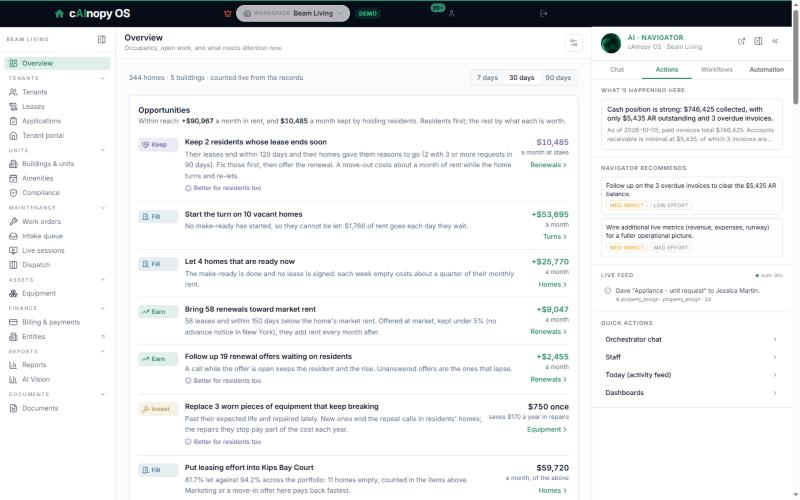
The orchestrator writes the brief, recommends the next move and logs what every agent did.
A module set, built in
Truecast and AI Vision, built in.
Live video inside CanopyAI OS: Truecast when people are on the call, AI Vision when the AI takes it. Every call that fixes it is a truck that never rolls.
- Diagnose without a truck roll.
- Estimate without a truck roll.
- Escalate to a senior without a second truck.
Maintenance agent
online
The filter light on my fridge is red.
MODEL FR-2650
SERIAL ••••••••
115V ~ 60Hz 3.1A
Nameplate read: model FR-2650. It takes filter WF-26.
I've ordered it and opened your request. It pushes in, no tools.
Job opened · part ordered · no visit
Diagnose
Your team, or an agent, sees what the customer sees.
- Reach into the environment. On a call or in a chat, send a link. One tap opens the customer's camera or screen, right in the browser. Nothing to install.
- Troubleshoot it together. A person walks the customer through it on a Truecast call, no AI needed.
- Or let AI Vision take it. It reads the nameplate, finds the right part and opens the job before the conversation ends.
- Close it on the call. Mark it “Fixed on the call” or “Not a problem”, and the job closes.
Estimate
Quote without a visit.
Walk the job with the customer on a Truecast call, see what it needs, and send the estimate while you are still on the call.
Escalate
One senior, many crews.
Dispatch sends a junior, backed by their senior. The junior goes live on Truecast from the job and the senior guides the fix from the command center. Your best people reach every job without driving to it. Licensed work still goes to a licensed tech.
Intake
Reports from any phone.
A QR code on the door or a link in a text. The customer films the problem, AI Vision reads it, and the report arrives sorted, each moment said plainly, the job opened.
Meetings
Where you meet.
Meet customers and your team face to face on Truecast, share a screen or a camera, record with a transcript. In place of Teams, Google Meet or Zoom.
The Truecast and AI Vision set
- AI Vision sessions
- Live sessions
- Intake & AI triage
- Calls & screen-pop
- Meetings
- AI Vision results
One system
One Operating System. Nothing to hand off.
The dispatch board, the jobs, the crews, the Equipment Library and the scoreboard all live in CanopyAI OS, with Truecast and AI Vision built in. What anyone sees and does on a call or in a chat, a person or the AI, lands in triage and the command center.
Scoreboard
Every truck you didn't roll, in dollars.
“Fixed on the call”, “Not a problem”, “Estimated” and “Guided” each count as a truck roll avoided, priced at your own cost per job.
Equipment Library
Every plate read, on file.
AI Vision reads the make and model off the nameplate. For each one, the library keeps the jobs per piece, recalls, parts, known failures, age, life left and cost a year.
From a published case study with Five Star Home Services
HVAC, plumbing and electrical in Ohio, about $50 million a year. Their figures, from Truecast, our video partner; not ours.
$480K
a year saved by keeping nuisance calls off the dispatch board
$3M+
a year saved in payroll, with junior techs taking complex calls while a senior watches on video
From 5% to all
of equipment captured, once techs took a photo instead of typing it in
Hardware
Connect your buildings.
Wireless, powerless door access
Doors that open for the right people, with no wiring to run.
Commercial solar
What the roof makes and saves, on the same screen as the bills.
Security cameras
What happened, found in seconds and tied to the unit, the job or the sale.
IoT monitoring
Leaks, temperatures and equipment watched around the clock; a job opens when something is wrong.
GoPros
Every job on video, before and after, filed to the job.
Sewer cameras
See the line before you dig, and show the customer what you saw.
Drones
Roofs and buildings inspected from the air, the pictures on the job.
See it on your buildings.
A short walk-through on your portfolio, then a seat in the beta if it's a fit.